Help
File - Midi Files
Contents:
Playing
Midi Files
How
to Save Midi Files to your PC
Back
to main Help Menu
Playing
Midi Files:
In Netscape... click your
mouse on the icon  ,
and you will see a box appear,
similar to Figure 1.

Figure 1
The file is now downloading
and will start playing shortly..
Figure 2 shows the midi
playing once downloaded.
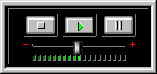
Figure 2
Saving Midi
Files to you PC :
When the midi file is playing
right click on the player,
and select Save
As.. in the menu as Figure 3.
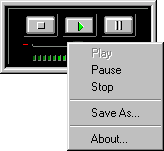
Figure 3
Make sure it is in the directory
that you want, and the name you want to call it, and press the Save
button.
© 1995-2000 The Smashing
Pumpkins Collection
Email : webmaster@smashing-pumpkins.net
Back
to main Help Menu
